A corporate website should help an unfamiliar visitor understand your business and decide whether to contact you. It is more useful to start with customer questions than to copy a competitor’s page count. This guide explains what the main pages need to do, when to add detail pages and how to check the structure before launch.
1. Plan around questions, not a fixed page count
List the questions your sales team hears from a new prospect. What does the company do? Who is the service for? What is included? How does a project begin? What information is needed for a quote? Group related questions before naming the pages. This prevents several thin pages repeating the same message, or one long page hiding information people need.
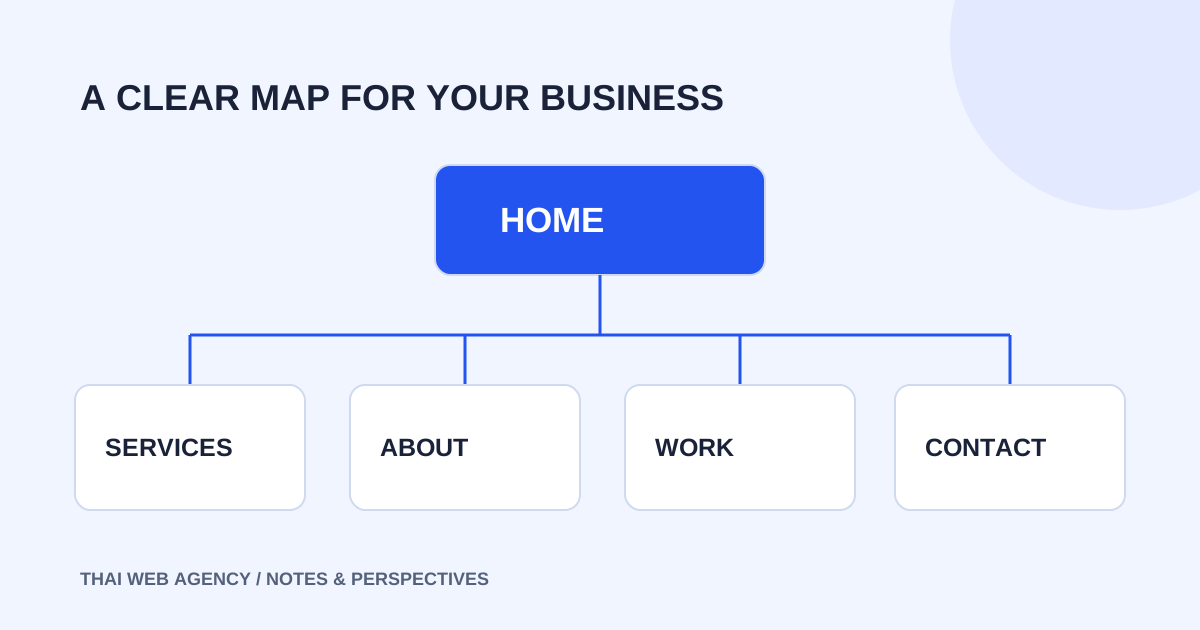
Home, services, about, work and contact are a useful starting structure, rather than a mandatory formula. A company with distinct services may need separate detail pages. A business without permission to publish client work does not need a portfolio full of unsupported claims. Decide what each page helps the reader understand before deciding how many pages to buy.
2. Make the homepage explain the business quickly
A visitor should understand your main offer without having to interpret a slogan. Use a heading that names the work and connects it to the customer’s situation. Follow it with a short explanation, a route to the service information and a clear way to make contact. Broad claims about leadership add little when the reader still cannot tell what you actually do.
The rest of the homepage provides an overview. Select the main services, a few useful examples, your process and the questions that come up before an enquiry. Link to the relevant detail pages rather than trying to include every paragraph on the homepage. Only publish experience figures, awards and client names when they have been verified and can be used.
3. Explain fit and scope on service pages
A service page should describe who the work is for, the problem it addresses and the deliverables. Include what needs separate assessment, the process and what the client should prepare. The frequently asked questions should be specific to the service; repeating one generic paragraph under different service names is not a useful comparison.
If you show starting prices, define the unit: pages, sections, products or another agreed deliverable. Separate development fees from platform subscriptions and optional tools. Put the contact action near the information that helps someone decide. A button labelled “Discuss your project on LINE” sets an accurate expectation when the next step is a conversation rather than a purchase.
4. Use the about and portfolio pages honestly
The about page explains the studio’s approach, relevant skills and how communication works. It does not need a long personal biography to be useful. If the business operates online without a physical storefront, describe that arrangement instead of inventing an address. Prospects need to know how a project will be handled and what responsibilities are agreed.
Client work should only be published with appropriate permission, without confidential information. If the work is a fictional design, label it Concept / Demo rather than presenting it as a customer result. Thai Web Agency’s twelve portfolio projects follow this approach: they demonstrate layouts and interactions, with no claim that the fictional brands are real clients or that the designs produced sales.
5. Keep contact information clear and operational
Choose a primary channel that the team actually monitors. An email address can be a useful alternative when it is part of your real workflow. Explain the short details that help the conversation: the business, website goal, any existing site and the desired schedule. Asking for a full specification before allowing contact can create unnecessary friction.
A form needs readable labels and an accurate result after submission. Test delivery before calling the form live. A success message should never imply that the team received a request when the backend is not connected. Our local preview explicitly states that it sends and saves no information; LINE and the listed email address are the real contact routes.
6. Add articles and languages with an ownership plan
Articles can answer questions before someone is ready to enquire, but they need an editor, review dates and a plan to check changing information. Start with questions your business can answer well. An empty article page is not a finished resource, and a promising headline does not replace a useful explanation.
Bilingual navigation should preserve the reader’s context. Switch a service page to its real counterpart. Only pair articles about the same topic; if no translation exists, send the reader to the selected language’s article index. Decide who maintains each language and how changes will be reviewed together, rather than treating a language button as the whole translation task.
7. Test the information journey before launch
Ask someone unfamiliar with the company to open the website on a phone. Can they explain the main offer, find the relevant scope and identify the next step? If not, improve headings and the information order before adding effects. Test links, contact routes and the agreed editing workflow as well as the visual presentation.
Use descriptive page titles and internal links that help readers find the next useful page. Google’s guidance supports making content understandable, but does not guarantee a first-place ranking. Content, technical readiness and ongoing review should be part of the plan rather than a promise that the website alone will deliver search results.
- Each page has a clear purpose and one main heading.
- Facts, prices and contact details have been reviewed.
- Images are licensed and text remains readable on phones.
- Links, forms and language switches work as described.
- Ownership of domains, systems and content is documented.
Sources and review date
The official sources below were checked on 1 October 2026 . Platform prices and conditions can change; check the official pages and purchase terms before committing.
Bring your brief to the conversation.
Share your goals, website type and editing needs. We’ll help assess an appropriate scope and approach on LINE.
Discuss your project on LINEExplore the related service →